Have you ever looked at the clock, thought “okay, what time will it be in 8 hours?”, and then somehow managed to make the calculation more confusing than it really is? It happens. Time looks wonderfully simple until you are adding hours around midnight, switching from PM to AM, or trying to remember whether that appointment is today or actually tomorrow.
An Hours From Now Calculator makes this little piece of everyday time arithmetic much easier. You give it a starting point, choose the number of hours to add, and it tells you the resulting future time. If the calculation moves beyond midnight, it can also show the corresponding date, which is often the part people forget when doing the maths in their head.
Whether you’re planning a meeting, setting a reminder, checking a delivery window, arranging a trip, or simply wondering what time it will be later, an Hours Calculator can save a surprising amount of mental effort. And honestly, there is something oddly satisfying about getting the exact answer without staring at the clock twice.
| Starting Time | Hours to Add | Future Time | Date Change |
|---|---|---|---|
| 8:00 AM | 2 hours | 10:00 AM | Same day |
| 8:00 AM | 8 hours | 4:00 PM | Same day |
| 10:00 AM | 10 hours | 8:00 PM | Same day |
| 12:00 PM | 6 hours | 6:00 PM | Same day |
| 3:00 PM | 2 hours | 5:00 PM | Same day |
| 6:00 PM | 4 hours | 10:00 PM | Same day |
| 8:00 PM | 6 hours | 2:00 AM | Next day |
| 9:00 PM | 8 hours | 5:00 AM | Next day |
| 11:00 PM | 2 hours | 1:00 AM | Next day |
| 11:00 PM | 10 hours | 9:00 AM | Next day |
| 8:00 AM | 18 hours | 2:00 AM | Next day |
| 8:00 AM | 20 hours | 4:00 AM | Next day |
| 8:00 AM | 24 hours | 8:00 AM | Following day |
| 8:00 AM | 48 hours | 8:00 AM | 2 days later |
| 8:00 AM | 72 hours | 8:00 AM | 3 days later |
What Is an Hours From Now Calculator?
An Hours From Now Calculator is a Time Calculator designed to determine a future time by adding a specified number of hours to a starting time. The starting point can be the Current Time, or you can enter another Starting Time if you are planning something for a particular hour.
For example, suppose your starting time is 3:00 PM and you want to add hours. Adding 2 hours gives you 5:00 PM. Nothing dramatic there, thankfully. But if you add 10 hours, the answer moves into the following day, so the calculator has to account for both the clock and the date.
This is why a simple time calculation is sometimes more than just adding two numbers. The calculator needs to understand hours, minutes, AM and PM, midnight, and potentially a date rollover.
In simple terms, it answers questions such as:
- What time will it be 8 hours from now?
- What time is 10 hours from now?
- What time is 18 hours from now?
- What time is 20 hours from now?
- What time is 72 hours from now?
- What time will it be after adding a specified number of hours?
- What date will it be after the calculation?
The result is a Future Time, and when the calculation passes midnight, it also becomes a future date.
How an Hours From Now Calculator Works
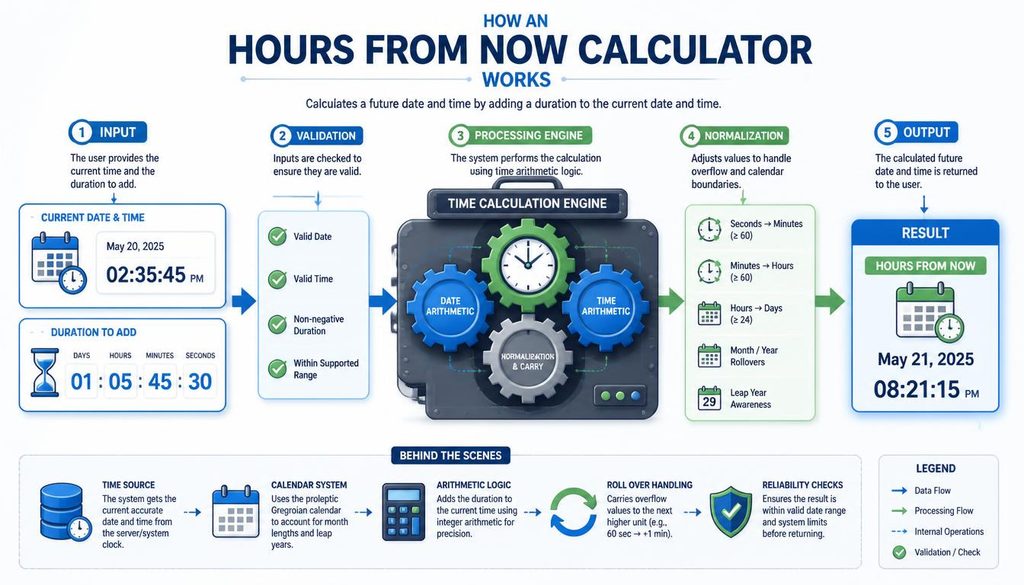
The basic idea behind hour addition is wonderfully straightforward: start with a time and move the clock forward by the requested number of hours.
If the starting time is 4:00 PM and you add hours equal to 3, the answer is 7:00 PM. The clock remains on the same date because you haven’t reached midnight yet.
Things become more interesting when the calculation crosses the AM/PM divide. Starting at 11:00 AM and adding 3 hours gives 2:00 PM. The hour changes, but the date doesn’t.
Now imagine starting at 11:00 PM and adding 2 hours. One hour takes you to midnight, and the second hour takes you to 1:00 AM on the following day. The clock has changed and, more importantly, the date has changed too.
A calculator handles this time rollover automatically, so you don’t have to keep track of each transition yourself. Small mercy, but a useful one.
Hours From Now Calculator: Add Hours to the Current Time
The most common use of an Hours From Now Calculator is to add hours to the current time.
Imagine it is 8:00 AM and you need to know what time it will be 8 hours later. Adding eight hours gives 4:00 PM. If you’re asking “what time is it in 8 hours?”, that’s the kind of question this calculator answers immediately.
The same process works for larger values. If you want to know what time is 10 hours from now, you simply move ten hours ahead from the current starting point.
For example:
- 8:00 AM + 4 hours = 12:00 PM
- 8:00 AM + 8 hours = 4:00 PM
- 8:00 AM + 10 hours = 6:00 PM
- 8:00 AM + 18 hours = 2:00 AM the following day
- 8:00 AM + 20 hours = 4:00 AM the following day
Notice how the last two examples cross midnight. That’s where a calculator becomes especially handy, because the answer isn’t only a clock time anymore; it also involves the next day.
Hours From Now Calculator for Date and Time
Time and date are connected more closely than we sometimes give them credit for. You can add five hours without changing the date, or you can add five hours and suddenly find yourself looking at tomorrow.
A Time and Date Calculator takes both parts into account. When the calculated time passes midnight, the result receives a new date.
For instance, consider a starting time of 11:00 PM on September 23. Adding 3 hours produces 2:00 AM on September 24. The calculation has crossed midnight, so the date advances by one day.
This is known as a date rollover or day rollover.
The same principle applies when adding 24, 48, or 72 hours. Adding 24 hours generally moves the calculation one calendar day ahead, while 72 hours represents three 24-hour periods. Of course, daylight-saving changes can make real-world elapsed-time questions more complicated in locations that observe them, so calendar time and elapsed duration are not always identical twins.
Adding Hours Across Midnight
Crossing midnight is probably the most common reason people prefer a calculator over mental arithmetic.
Suppose your Starting Time is 9:00 PM and you need to add 6 hours. You could count forward:
9 PM → 10 PM → 11 PM → 12 AM → 1 AM → 2 AM → 3 AM.
The answer is 3:00 AM on the following day.
That sounds easy enough, but when the starting time includes minutes, things can get slightly more annoying. For example, 11:35 PM plus 4 hours becomes 3:35 AM the next day.
The minutes stay the same when you’re only adding whole hours. That’s one of the useful little rules of time arithmetic. Still, the date needs to change once the calculation passes midnight.
Adding Minutes Along With Hours
Although an Hours Calculator focuses on hours, many time calculations also involve minutes. Since an hour contains 60 minutes, adding minutes can eventually create another complete hour.
For example, if your starting time is 2:45 PM and you add 2 hours and 30 minutes, the calculation works like this:
2:45 PM + 2 hours = 4:45 PM.
Then add 30 minutes.
The final result is 5:15 PM.
This is why an add time calculator can be useful when your schedule isn’t conveniently arranged around whole hours. Meetings, cooking times, travel estimates, medication reminders, work shifts, and appointments often use minutes as well.
A Minutes to Hours Converter can also help when a duration is given entirely in minutes. For example, 120 minutes equals 2 hours, while 90 minutes equals 1 hour and 30 minutes. The numbers are simple, but when you’re doing several conversions in a row, having a tool nearby is rather nice.
12-Hour Clock and AM/PM Calculations

Most people are comfortable with the 12-hour clock, where the day is divided into AM and PM. The first half uses AM, while the second half uses PM.
This creates a few moments where manual calculations can become slightly awkward.
For example:
3:00 PM + 2 hours = 5:00 PM.
That one is easy.
But:
11:00 PM + 2 hours = 1:00 AM the following day.
The calculation crosses the AM/PM divide and midnight at almost the same time. This is where mistakes love to sneak in, especially when you’re tired and doing the calculation at, well, 11 PM.
A calculator doesn’t need to guess which side of the clock you’re on. It simply follows the time sequence.
24-Hour Clock and Military Time
The 24-hour clock, sometimes called military time, represents the entire day using numbers from 00 through 23 for the hour portion.
This eliminates the need for AM and PM.
For example:
- 1:00 AM = 01:00
- 11:00 AM = 11:00
- 1:00 PM = 13:00
- 6:00 PM = 18:00
- 11:00 PM = 23:00
So if you are working with 24-hour time and start at 23:00, adding 2 hours produces 01:00 on the next day.
A 24-hour to 12-hour time converter can then change 01:00 back into 1:00 AM. This kind of time conversion is useful when information comes from different sources that use different clock systems.
Travel schedules, hospitals, transportation systems, workplaces, international communications, and digital systems often use the 24-hour format. Learning both formats makes calculate time tasks considerably less fiddly.
How to Add Hours to a Time Manually
You don’t always need a calculator. For a small calculation, manual time addition is perfectly manageable.
Start with the hour, then move forward by the number of hours you need to add. Keep an eye on whether you cross 12:00, midnight, or another important clock boundary.
For example, to add hours to time:
Starting time: 6:00 PM
Hours to add: 5
Move forward:
6 PM → 7 PM → 8 PM → 9 PM → 10 PM → 11 PM.
The answer is 11:00 PM.
If you add two more hours instead, the sequence continues through midnight:
11 PM → 12 AM → 1 AM.
So 6:00 PM plus 7 hours is 1:00 AM the next day.
The important part isn’t really the arithmetic. It’s remembering that 12:00 AM represents midnight, and once you pass it, you’re working with the next calendar date.
How to Calculate Future Time
To calculate future time, identify three things first: your starting time, the number of hours you want to add, and whether minutes are involved.
Once those are known, move forward through the clock.
A basic example looks like this:
Starting time: 10:00 AM
Hours to add: 6
Future time: 4:00 PM
A longer calculation:
Starting time: 7:00 PM
Hours to add: 8
Future time: 3:00 AM the following day.
If you’re using a calculator, you generally don’t need to manually perform each step. Enter the starting point and duration, and the time calculation tool handles the rollover.
That can be particularly useful when the number is large. Asking “what time is 72 hours from now?” is technically simple, but nobody really wants to count seventy-two little clock movements in their head.
Common “Hours From Now” Questions
People use future-time calculators for some very specific questions, and several of them appear again and again.
What time is 8 hours from now?
Take the Current Time and move forward eight hours. If the result crosses midnight, the calculator should also indicate the following day.
For example, if the starting point is 8:00 AM, eight hours later is 4:00 PM.
What time is 10 hours from now?
Add ten hours to the starting point. If the starting time is 6:00 PM, ten hours later is 4:00 AM the next day.
What time is 18 hours from now?
Eighteen hours is three-quarters of a full 24-hour day. If the starting time is 8:00 AM, the answer is 2:00 AM the following day.
What time is 20 hours from now?
Twenty hours moves you close to a full day ahead. Starting at 8:00 AM, adding 20 hours produces 4:00 AM on the following day.
What time is 72 hours from now?
Seventy-two hours equals three 24-hour periods. If no unusual calendar or time-zone adjustment is involved, that means the same clock time three days later.
These examples show why the phrase hours from now is really about both time and date. The farther ahead you calculate, the more important the date becomes.
What Time Was It 15, 16, 17, 18, or 19 Hours Ago?
A future-time calculator can also be used in reverse.
Instead of asking how to add hours, you subtract them from a starting time.
For example, if the current time is 6:00 PM:
- 15 hours ago was 3:00 AM.
- 16 hours ago was 2:00 AM.
- 17 hours ago was 1:00 AM.
- 18 hours ago was 12:00 AM.
- 19 hours ago was 11:00 PM on the previous day.
The last example is especially useful because it demonstrates the reverse version of a date rollover. When you move backward past midnight, you enter the preceding calendar date.
So the same basic principle works in both directions: adding hours moves forward, while subtracting hours moves backward.
Why Exact Time Matters

An approximate answer isn’t always enough. Saying “sometime tomorrow afternoon” can be perfectly fine for a casual plan, but it won’t help much if you’re trying to schedule a meeting or set a deadline.
An exact time result can tell you the hour and minute, while a date calculation tells you exactly which day it falls on.
This becomes important for:
- Scheduling meetings
- Setting reminders
- Planning activities
- Calculating future appointments
- Organizing events
- Checking deadlines
- Planning travel
- Estimating when a task will finish
Even a one-hour mistake can matter when several people are coordinating their schedules. Time is a funny thing that way; an hour sounds tiny until it makes everyone wait around.
Hours From Now vs. Time Difference
An Hours From Now Calculator and a Time Difference calculator may sound similar, but they answer different questions.
An hours-from-now calculation starts with a known time and moves forward or backward by a duration.
A time-difference calculation compares two known times to determine how much time exists between them.
For example, if a meeting starts at 2:00 PM and ends at 5:30 PM, the time difference is 3 hours and 30 minutes.
If you instead ask what time it will be 3 hours and 30 minutes after 2:00 PM, you’re performing a future-time calculation.
They are related forms of time arithmetic, but the direction of the question changes what you need to calculate.
Choosing Between 12-Hour and 24-Hour Time
There isn’t a complicated rule saying one clock format must always be used. The best format is usually the one that makes your calculation easiest to understand.
The 12-hour clock is familiar to many people because it uses AM and PM. It’s natural for everyday conversation: “the appointment is at 3 PM.”
The 24-hour clock is useful when precision matters and AM/PM confusion could cause trouble. Instead of 3 PM, you write 15:00.
For calculations around midnight, the 24-hour system can sometimes feel cleaner because the hours progress from 00 to 23 without resetting at 12.
Still, a good calculator should be able to work with either time format, so you can use whichever feels natural.
Real-Life Uses for Adding Hours
The usefulness of an online time calculator isn’t limited to people who enjoy staring at clocks. It solves ordinary problems that show up throughout the day.
Someone might need to know when a work shift ends after a certain number of hours. A traveler might want to calculate when a journey reaches its expected finish. A student could calculate when a study session ends, while someone planning an event might need to know exactly when preparations should begin.
Even simple reminders can benefit from accurate future time calculations.
Suppose a task starts at 9:30 AM and takes 7 hours. Adding seven hours gives 4:30 PM. If the task begins late in the evening and lasts several hours, the same calculation may move into the next day.
The tool doesn’t change the schedule. It simply makes the relationship between the schedule and the clock easier to see.
Tips for Getting Accurate Time Calculations
Before relying on a calculated result, check the starting point carefully. A calculator can perform the arithmetic correctly, but it can’t rescue an incorrect starting time.
Pay attention to AM and PM when using the 12-hour clock. Entering 7 AM instead of 7 PM creates a completely different future time.
If you’re working with 24-hour time, remember that 13:00 means 1:00 PM, while 23:00 means 11:00 PM.
Also check whether the answer crosses midnight. A result such as 1:00 AM may belong to tomorrow rather than today.
And if your calculation includes minutes, don’t forget that there are 60 minutes in an hour. That little fact does quite a lot of work in time arithmetic.
Why a Calculator Is Better for Long Calculations
Adding two or three hours mentally is easy enough. Adding 18 hours, then 45 minutes, while crossing midnight and checking the date is where the human brain may decide it has other plans.
An Hours Calculator gives you a repeatable method. You provide the starting time and duration, and the result is calculated consistently.
This is especially helpful when you are making several calculations in succession. Instead of remembering intermediate results, you can calculate each one directly.
For people managing schedules, projects, appointments, travel plans, or deadlines, that consistency can reduce little mistakes that later become surprisingly large inconveniences.
Understanding “Hours From Now” as a Duration

The phrase hours from now describes a duration measured from the present starting point.
If something is 2 hours from now, its position on the clock depends on what the current time is. The phrase does not represent a fixed clock time.
For instance, 2 hours from 3 PM is 5 PM. But 2 hours from 10 PM is midnight, and 2 hours from 11 PM is 1 AM the next day.
The duration remains two hours. The clock representation changes because the starting point changes.
That’s the central idea behind an Hours From Now Calculator: the calculator isn’t looking for one universal answer. It is calculating the answer from a specific starting time.
Frequently Asked Questions
4.5 hours from now
4.5 hours from now means 4 hours and 30 minutes after the current time. Simply add 4 hours and 30 minutes to the present time to get the exact result.
120 hours from now
120 hours from now is exactly 5 days from the current time. The resulting time of day will remain the same.
an hour and a half from now
An hour and a half from now means 1 hour and 30 minutes after the current time. Add this duration to find the exact future time.
28 hours from now
28 hours from now equals 1 day and 4 hours after the current time. This means the result will occur on the following day.
7.5 hours from now
7.5 hours from now means 7 hours and 30 minutes after the current time. Add 7 hours and 30 minutes to calculate the exact time.
Readd this blog: https://avenzum.com/12-weeks-ago-from-today/
Final Thoughts on Hours From Now Calculator – Add Hours
Time calculation doesn’t need to feel like a tiny puzzle you accidentally received before breakfast. Once you understand the relationship between Starting Time, hours, minutes, AM, PM, and the calendar date, adding time becomes much more predictable.
An Hours From Now Calculator simply puts those rules into a convenient tool. It can help you add hours, calculate a Future Time, handle midnight, identify the following day, and keep a Time and Date Calculator result clear when the clock moves beyond the current date.
Whether you’re asking what time will it be, trying to calculate hours ahead, checking what time was 18 hours ago, or planning something several days into the future, the basic principle stays the same: start from a known time, apply the duration, and account for every date rollover along the way.
And perhaps that’s the nicest thing about working with time. The clock keeps moving whether we’re ready for it or not, so having a simple way to understand where those hours are taking us can make the whole day feel a little less slippery.
If you’d like, I can also turn this into a more human-written SEO version with a stronger conversational tone, add an FAQ section with 15–20 search-style questions, or optimize the article for a specific target keyword density without making it sound stuffed.